AldoMedia logo .BIZ

Workstation Guide: Buffalo NY

Performance PC Desktops in Buffalo NY

A gaming tower fakes speed in short bursts. A workstation holds it for eight hours straight. This guide breaks down the Xeon, Threadripper, and RTX Pro desktops that Buffalo engineers, editors, and analysts actually depend on, tier by tier, with live Amazon pricing.

Updated July 2026 · Business configs change weekly · Editors rating 4.8 / 5

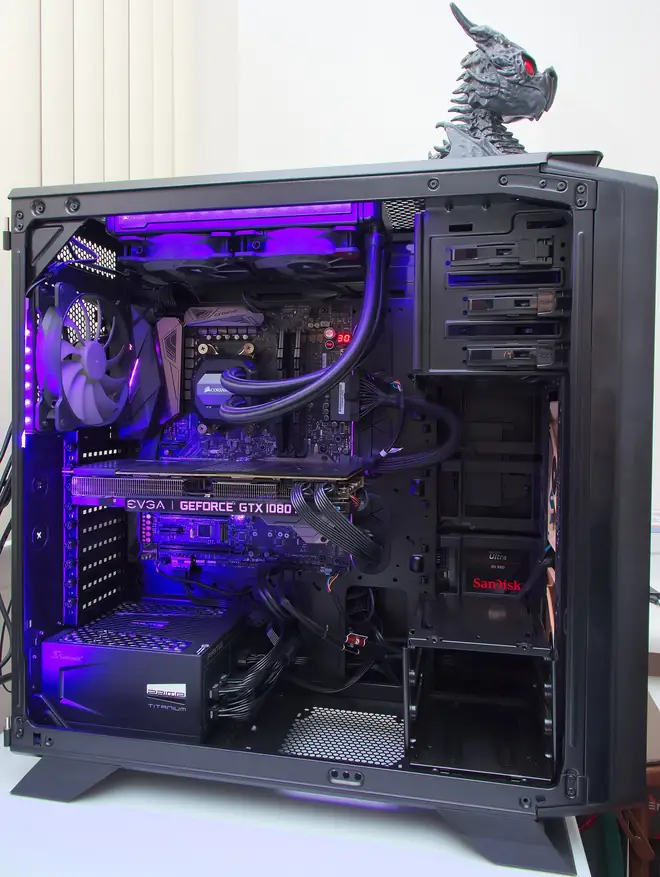
Black performance workstation tower with its side panel removed showing liquid cooling and purple lighting

#What Separates a Workstation From a Fast PC

Three things, and none of them show up in a benchmark screenshot: error correcting memory, ISV certified drivers, and a thermal design built for sustained load rather than sprints.

ECC RAM catches the random bit flips that consumer memory silently passes through, which matters when hour 30 of a structural solve is riding on it. ISV certification means Autodesk, Dassault, and Adobe have validated the exact hardware and driver combination you are running, so support tickets get answered instead of deflected. And a proper workstation chassis moves enough air to hold a Threadripper at full clocks all day without the fan roar or thermal throttling a gaming case would show by lunch.

You pay for those three things. Entry workstations start near 1,999 dollars where a similarly quick gaming build costs 1,400. The premium buys reliability you only notice on the day it saves a deadline, which is exactly the point.

Workstation desktops on Amazon

Compare Lenovo ThinkStation, HP Z, and Dell towers with business grade warranties and Prime shipping to WNY.

As an Amazon Associate, AldoMedia.Biz earns from qualifying purchases.

Compare specs on Amazon (opens in a new tab)

#Three Workstation Tiers, Priced Honestly

Match the tier to the work, not to the budget you wish you had.

Entry Workstation $1,999 to $3,499

Lenovo ThinkStation P3 Tower, HP Z2 G9, and the Dell tower line that used to wear the Precision badge all live at this tier. Expect a Core Ultra 7 or Xeon E class processor, 32GB of ECC memory, and an RTX 2000 Ada card. That combination handles full SolidWorks assemblies, Revit models, and 4K Premiere Pro timelines without drama.

CPU: Core Ultra 7 or Xeon E · RAM: 32GB ECC · GPU: RTX 2000 Ada class

See ThinkStation P3 pricing on Amazon (opens in a new tab)

Mid Workstation $3,500 to $6,999

This is where most Buffalo firms should land. A 24 core Threadripper 7960X or Xeon W chip, 64GB to 128GB of ECC RAM, and an RTX 4500 Ada class GPU chew through FEA solves, 8K footage, and heavy Revit coordination models. Lenovo ThinkStation P5 and HP Z4 dominate the tier.

Who should buy it

Engineering teams running simulation weekly, video shops delivering broadcast work, and any analyst whose scripts currently run overnight. The jump from entry tier roughly halves solve and render times, which pays for itself fast at billable rates.

CPU: 24 core Threadripper or Xeon W · RAM: 64 to 128GB ECC · GPU: RTX 4500 Ada class

Top Workstation $7,000 to $9,999+

Threadripper PRO with up to 96 cores, 256GB or more of eight channel ECC memory, and RTX Pro 6000 class graphics. HP Z8 Fury and ThinkStation PX are the flagships. Nobody buys this tier casually; you buy it because a render farm invoice or a cloud compute bill told you to.

CPU: up to 96 core Threadripper PRO · RAM: 256GB+ ECC · GPU: RTX Pro 6000 class

View live Threadripper PRO pricing (opens in a new tab)

#Spec Floor by Discipline

Minimum sensible workstation tier by profession, July 2026
DisciplineTierPriority SpecTypical Spend
CAD and FEA engineeringMidCores + ECC RAM$4,500
4K and 8K video editingMidGPU + fast NVMe$3,500
Architecture and renderingEntry to MidGPU VRAM$2,499
Data science and MLMid to TopGPU VRAM + RAM$6,999
2D drafting and GISEntryCertified drivers$1,999
Power tip: Lake-effect storms knock out power somewhere in Erie County every winter. A 1500VA UPS costs about 150 dollars and turns a lost afternoon of simulation into a clean save and shutdown. No workstation order should ship without one.

#Who Runs These in Buffalo

The buyers we hear from cluster in three places. Research teams around the Buffalo Niagara Medical Campus push GPU memory hard for imaging and machine learning work. Architecture and engineering firms in the Larkin District live in the entry and mid tiers, where certified Revit and AutoCAD performance matters more than raw core count. And the startups stacked into Seneca One tend to buy one mid tier box for the data person and standard hardware for everyone else, which is usually the right call.

If your workload is games first and spreadsheets second, skip the ECC premium and read our high-end gaming desktops guide instead. Need the horsepower on the move? The mobile equivalents live in our performance laptop roundup. And if this whole page is overkill, a solid office tower from our student and business desktop guide costs a third as much.

Local stock is thin. Big box stores around Buffalo carry gaming towers, not Xeon or Threadripper machines, so workstation buyers here order direct or through Amazon Business. Configure carefully, because ECC memory and Pro GPUs rarely appear as upgrade SKUs later.

#Workstation Questions, Answered

Do I really need ECC RAM in a workstation desktop?

If a flipped bit can cost you money, yes. ECC memory catches and corrects single bit errors that plain RAM lets through. For a 40 hour render or an overnight FEA solve, that protection is worth far more than the roughly 150 dollar premium it adds.

Is a gaming desktop good enough for professional CAD work?

For light SolidWorks assemblies, often yes. The trouble starts with large models and simulation, where GeForce drivers are not certified and viewport glitches appear. Firms billing real hours should stick with an RTX Pro card and certified drivers, then keep the gaming rig at home.

What does ISV certification actually mean?

Independent software vendors like Autodesk, Dassault, and Adobe test specific workstation configurations against their applications. A certified machine has a documented, supported hardware and driver combination, so when something breaks, the vendor helps instead of blaming your graphics card. It matters most in engineering and simulation work.

Can I get on-site workstation service in Western New York?

Yes. Lenovo, HP, and Dell all sell next business day on-site plans that cover Buffalo ZIP codes, usually 100 to 300 dollars per year. A technician comes to your office with parts, which beats shipping a 40 pound tower away for two weeks.

Can a Buffalo business write off a workstation purchase?

Most local firms expense the full cost in the purchase year under Section 179 rules, which makes a December order surprisingly popular. Confirm the details with your accountant, keep the invoice, and remember that monitors, docks, and UPS units ordered together typically qualify as well.

Ready to spec your workstation?

Browse current Xeon and Threadripper configurations with delivery dates for Buffalo and Erie County.

As an Amazon Associate, AldoMedia.Biz earns from qualifying purchases.

See current availability (opens in a new tab)