
AldoMedia logo .BIZ

Network Gear: Buffalo NY

WiFi Routers in Buffalo NY: Picks and Deals

Blame the house, not the internet plan. Buffalo housing stock is beautiful and hostile to WiFi: double brick exteriors, plaster over wire lath, and staircases in all the wrong places. The right router strategy fixes it for between 150 and 500 dollars.

Updated July 2026 · Tested against plaster walls · Editors rating 4.8 / 5

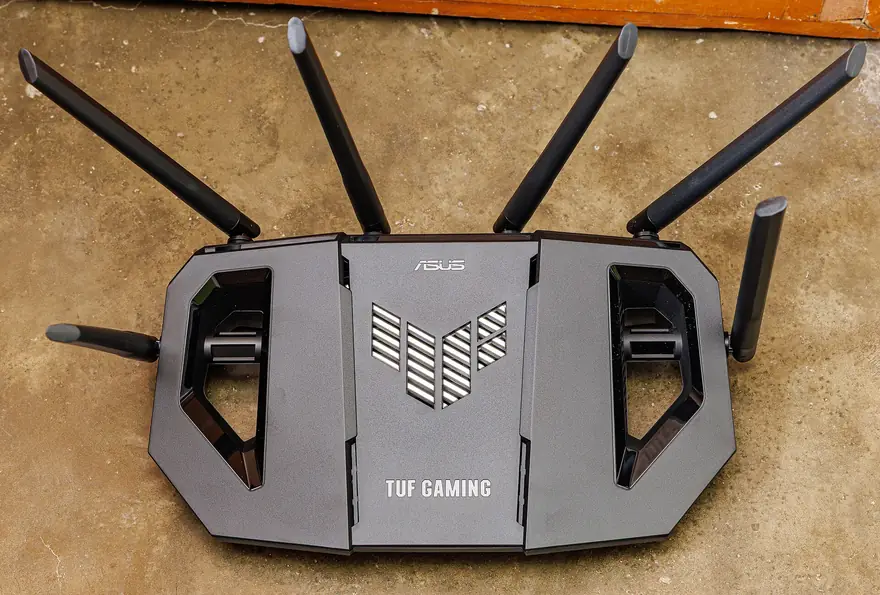
Black ASUS TUF Gaming router with six antennas laid out on a concrete floor

#Why Buffalo Houses Eat WiFi Signals

A 1920s North Buffalo double was built to last a century, and it has. The problem is that wire lath under plaster acts like a Faraday cage, and a brick party wall between units can drop a 5 GHz signal by half. The router in the front parlor works great in the front parlor and nowhere else.

Renters in Allentown three-stories see the vertical version of the same problem: one router cannot punch through two old floors, so the attic bedroom becomes a dead zone the day the weather forces everyone inside to work. Snow days are exactly when the network gets its worst stress test, with two video calls, a lecture stream, and a console update all running at once.

The cure is placement plus radios, in that order. Get the primary unit out of the basement and onto the main floor, centered if the coax allows it. Then decide between one strong standalone router and a multi-node mesh, which is the real fork in the road below.

#Mesh System or Gaming Router: Pick Your Camp

Simple rule from years of house calls: under 1,500 square feet on one or two open floors, a single quality router wins on price and latency. Over that, or with brick and plaster in the signal path, mesh wins and it is not close.

Gaming routers like the ASUS TUF and RT-AX86U line earn their keep in a different way than marketing suggests. Their advantage is traffic control: quality of service that keeps your Call of Duty session smooth while housemates stream a Sabres game in 4K. Buy one for a compact home where every device is within two rooms of the antennas.

Mesh buys coverage instead of muscle. Two or three coordinated nodes blanket a full double from the basement office to the back bedroom, and devices hop between nodes silently as you walk. Pair either choice with your own modem from our cable modem guide and the monthly rental fee disappears too. Roommates worried about privacy on shared networks should also skim our VPN service picks.

Mesh and gaming routers on Amazon

Every pick below ships with Prime and returns free if your walls out-stubborn it.

As an Amazon Associate, AldoMedia.Biz earns from qualifying purchases.

View on Amazon (opens in a new tab)

#The Three Setups We Install Most

Eero Pro 6E, 3 pack $399 to $499

The set-and-forget mesh. Setup runs entirely from a phone app in fifteen minutes, updates install themselves overnight, and the tri-band design keeps node-to-node traffic off the channels your devices use. In a full Buffalo double with a basement office, three nodes deliver working speeds to every room we have ever tested them in.

The tradeoff

Advanced controls live behind a subscription, and tinkerers will find the app limiting. Buy it for households that want WiFi to be an appliance, not a hobby.

WiFi 6E tri-band · Covers 6,000 sq ft · App managed · 2 ports per node

Check Eero Pro 6E pricing on Amazon (opens in a new tab)

ASUS RT-AX86U Pro $229 to $249

The standalone king and the gamer favorite. Real quality of service controls, a 2.5 gigabit port for your modem, and firmware ASUS has supported for years without a subscription attached. In a compact Riverside bungalow or an apartment, it saturates a gigabit Spectrum plan and holds ping steady on game night.

WiFi 6 dual band · 2.5 GbE WAN · Gaming QoS · No subscription

See RT-AX86U Pro listings on Amazon (opens in a new tab)

TP-Link Deco XE75, 2 pack $150 to $250

Budget mesh that punches way up. Two nodes cover a typical flat or ranch, the app is clean, and no features sit behind a paywall. Radio performance trails the Eero slightly through dense walls, which matters in the oldest housing but not in a 1950s Cheektowaga build with drywall interiors.

WiFi 6E tri-band · Covers 5,500 sq ft · Free parental controls · 3 ports per node

Compare Deco XE75 kits on Amazon (opens in a new tab)

#Match the Router to the House

Router picks by Buffalo housing type, July 2026 pricing
Home TypeBest SetupBudgetWhy
Apartment or flatRT-AX86U Pro$229One radio covers it all
1950s suburban ranchDeco XE75, 2 pack$150 to $250Drywall is easy mode
Pre-war doubleEero Pro 6E, 3 pack$399 to $499Beats brick and plaster
Three-story with attic officeMesh, one node per floor$250 to $499Vertical coverage
Placement beats hardware: a 150 dollar mesh kit positioned well outperforms a 500 dollar router in the basement. Main floor, off the ground, away from the microwave and the fish tank. Yes, the fish tank; water absorbs 2.4 GHz beautifully.

#Router Questions from Buffalo Households

What is the difference between mesh and a WiFi extender?

An extender rebroadcasts your signal under a second network name and typically halves throughput. Mesh nodes coordinate as one network with one name, hand devices off automatically as you move, and keep speeds far higher. Extenders are a patch; mesh is a fix.

How many mesh nodes does a two story Buffalo double need?

Two nodes handle most flats, one per floor, staggered diagonally rather than stacked. A full double with a finished attic or basement office usually wants three. Start with two and add a node only if a dead corner survives.

Is a WiFi 7 router worth buying in 2026?

Only if you already own WiFi 7 laptops and phones and run a plan above 500 megabits. For everyone else, WiFi 6 and 6E gear now sells at deep discounts and will saturate a typical Spectrum connection with room to spare.

Do gaming routers actually lower ping?

Inside your house, yes, a little. Quality of service settings keep a console prioritized while three roommates stream, which prevents lag spikes. They cannot shorten the path to a game server in Chicago, so expect steadier ping rather than dramatically lower ping.

Is the basement a bad spot for my router?

Usually terrible, and it is where Buffalo cable drops often enter the house. Radio waves fight through joists, ductwork, and a floor of plaster before reaching anyone. Run one Ethernet cable up to the main living level and put the router or first mesh node there.

Fix the dead zones this weekend

Every setup above installs in under an hour with nothing but a phone.

As an Amazon Associate, AldoMedia.Biz earns from qualifying purchases.

View live pricing (opens in a new tab)