AldoMedia logo .BIZ

Remote Work Gear: Buffalo NY

Webcams in Buffalo NY: Best Deals and Picks

Remote work stuck around, and so did the gray. Between Thanksgiving and Easter, Buffalo home offices fight some of the dimmest natural light in the country, and cheap cameras turn it into static. Here are the webcams that stay sharp through it, from 59 to 249 dollars.

Updated July 2026 · Tested on Zoom, Meet, and Teams · Editors rating 4.6 / 5

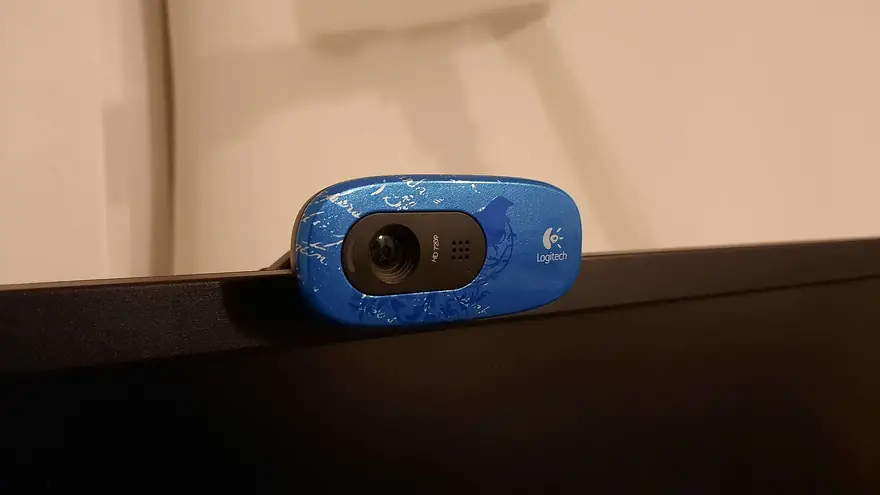
Blue patterned Logitech webcam clipped to the top edge of a dark computer monitor

#Fix the Light Before You Blame the Camera

A camera can only process the photons it receives, and a north-facing apartment off Hertel Avenue in January does not offer many. Before spending 200 dollars, try the free fix: turn your desk so a window sits in front of you, never behind you. Backlighting is why the blinds glow while you become a silhouette.

If the window fails you by 4 pm, and here it will, a small LED panel or ring light behind the laptop fills your face for about 30 dollars. Warm it slightly so you do not glow blue, and raise it near eye height. This single change upgrades every camera on this page more than any spec bump between them.

Then, and only then, does the hardware ranking below matter. We tested against dark paneled rooms, gray-sky afternoons, and one aggressively beige Larkin District coworking desk.

#Our Webcam Picks for WNY Desks

Logitech MX Brio $199 to $249

The big-sensor flagship, and the difference shows exactly when Buffalo needs it: dreary afternoons where lesser cameras smear detail into mush. Auto exposure holds skin tones steady as clouds roll through, the 4K sensor delivers a pristine downsampled 1080p, and a twist of the privacy shutter ends the meeting definitively.

Who justifies the price

Anyone on camera for hours daily: managers on hybrid schedules with downtown employers, consultants, and telehealth providers whose face is the product.

4K30 or 1080p60 · Large sensor · Show Mode desk view · USB-C
Check the MX Brio price on Amazon (opens in a new tab)

Logitech C920s $59 to $69

The decade-old default for a reason. Sharp 1080p at 30 frames, dependable autofocus, and drivers so mature that nothing ever breaks. In good light it embarrasses cameras twice its price; in dim rooms it needs the lighting help above. For a student on a UB budget or a spare desk, it remains the value answer.

1080p30 · Privacy shutter · Dual mics · Plug and play

See C920s pricing on Amazon (opens in a new tab)

Insta360 Link 2 $199

A tiny gimbal camera that physically follows you. Stand up to whiteboard something and it pans; sit back down and it reframes. The AI tracking feels like a camera operator, which makes it the pick for teachers, fitness instructors, and streamers who move. Image quality in low light lands just behind the MX Brio.

4K30 gimbal · AI tracking · Gesture control · Desk overhead mode

Compare Link 2 models on Amazon (opens in a new tab)

#Sensors, Frame Rates, and Street Prices

Webcam picks compared, July 2026
CameraPriceMax VideoLow LightBest For
Logitech C920s$591080p30FairBudget desks
Insta360 Link 2C$1494K30 fixedGoodTracking on a budget
Insta360 Link 2$1994K30 gimbalGoodPresenters who move
Logitech MX Brio$199 to $2494K30, 1080p60ExcellentAll-day meetings
Mounting matters: perch the camera at eye level, not laptop-hinge level. A 15 dollar small tripod behind the screen fixes the up-the-nose angle that monitor mounts force on tall displays, and it frees the camera for document shots.

#Round Out the Home Office

Video is half the impression; the connection is the other half. A webcam cannot out-perform a WiFi dead zone, so if your office sits two plaster walls from the router, the coverage fixes in our router and mesh guide come first. Households still paying equipment rental should also run the math in our cable modem guide, since the savings fund a very nice camera.

Streamers and content creators eventually outgrow webcams entirely and step to mirrorless bodies over HDMI. That path runs through our Canon camera guide, but it costs ten times as much for maybe twice the image. Start with the webcam; upgrade when an audience demands it.

Webcams and lighting on Amazon

Every pick above plus the key lights that carry Buffalo winters.

As an Amazon Associate, AldoMedia.Biz earns from qualifying purchases.

View on Amazon (opens in a new tab)

#Webcam Questions from Buffalo Home Offices

Is my laptop camera really that much worse than a webcam?

Usually, yes. Laptop lids leave room for a tiny sensor that starves in dim rooms and shoots up your nose from below. A 60 dollar external camera brings a bigger sensor, better placement at eye level, and a sharper lens.

Is a 4K webcam pointless if Zoom caps my video at 1080p?

The extra pixels still help. A 4K sensor downsamples to a cleaner 1080p image, and it lets you crop or punch in without going soft. You are buying sensor quality and framing flexibility, not literal 4K delivery to your coworkers.

Why does my video look grainy from November to March?

Low light. Gray skies and short days starve small sensors, so the camera raises gain and grain follows. Face a window, add a small key light, and the same camera suddenly looks two price tiers better.

Do these webcams work on a Mac?

All of them are plug and play over USB on macOS, Windows, and ChromeOS. Fine tuning apps like Logi Options+ and Insta360 Link Controller also run on Mac, so exposure, framing, and zoom presets carry over no matter the platform.

Should I use the webcam microphone or a headset?

Headset, almost every time. Webcam mics sit an arm away and drink in room echo and keyboard clatter. Colleagues forgive soft video long before they forgive muddy audio, so spend on sound before you spend on a second light.

Upgrade before Monday standup

Order today and look noticeably better on your next call.

As an Amazon Associate, AldoMedia.Biz earns from qualifying purchases.

See current availability (opens in a new tab)